
Xenithar
-
Posts
1419 -
Joined
-
Last visited
-
Days Won
3 -
Donations
90.00 GBP
About Xenithar

- Birthday 06/13/1980
Xenithar's Achievements

Advanced Member (3/3)
6
Reputation
-
 I want to update this topic. H0zen gave me a patch to try and a detailed testing guide. After applying the patch, everything appears to work now. Every test in his guide passed. This was a code fix, not a database fix.
 -
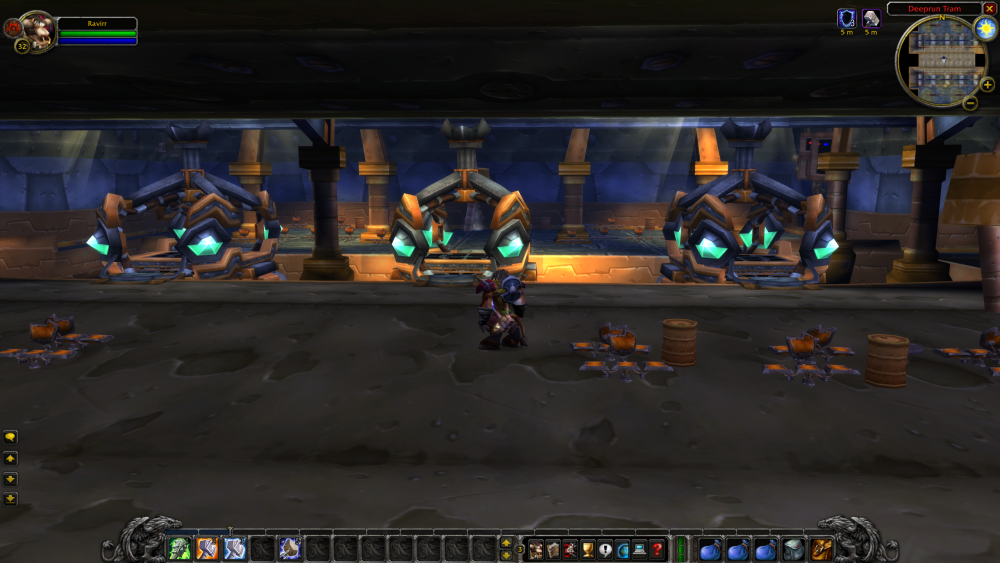
Okay, everything in the database is correct, so this isn't as simple as I had hoped. I attached a picture of the rotated cars for reference. Not sure what is going on here, but maybe it has something to do with MaNGOS <-> client communication or the way the model gets loaded. Another problem I noticed is that only one tram loads. Last time the tram closest to the portals was running. After restarting mangosd it was the one further away from them. May be related but I am not sure. The database matches historically correct settings, so I am not sure yet.
-
Now that I think about it, I believe the tram was rotated 90deg also. Time to break out dBeaver! Thank you, H0zen.
-
Okay, so my friends and I have been bug-hunting. We found that the Deeprun Tram appears to have both trams on one track and only one is visible to players, but it's not the same one for all players. This makes it impossible to board or, should you glitch on, exit the trams. In addition, one of the elevators and doors for UC is rotated about 90deg out. I am sure this is in the database and I can fix/test/PR it, but where? These are not transports so they're not in there, but where are they?
-
server Transports dropping charactes
Xenithar replied to Xenithar's topic in Peer to Peer Technical Support
Okay, for some reason either I did not transfer the gomodels directory to the server, or it failed to transfer. H0zen was helping me try to figure things out and I realized the directory was not there. Copying it over resolved the issue. -
server Transports dropping charactes
Xenithar replied to Xenithar's topic in Peer to Peer Technical Support
I've attached the GPS info you requested. I hopped onto the boat at Booty Bay and got the info while on the boat, as requested.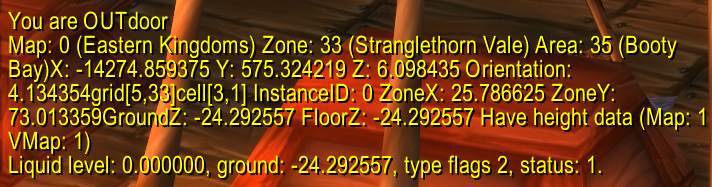
-
server Transports dropping charactes
Xenithar replied to Xenithar's topic in Peer to Peer Technical Support
I use the latest from github. Last build was a week ago. I just made the changes to my config and restarted the server. I'll get the requested info shortly. As for more info, you get onto a ship/zep when it is docked. It carries you away but then the ship/zep is removed from the game world, your character drops back to the world instead of teleporting. -
server Transports dropping charactes
Xenithar replied to Xenithar's topic in Peer to Peer Technical Support
So this is a bug that needs squashing, not a misconfiguration on my end? -
Got a strange one I've been trying to resolve today. Transports (ships/zeppelins) will disappear and leave the players to fall into the ocean. I'm not seeing any errors in the console window or in the logs. No warnings. I mean I get a lot of spam about being asked to load an already loaded navmesh tile, but I don't believe that is the issue. I've dug through the configs and found nothing that should be stopping these things from carrying passengers. Is this a known issue or have I mucked up something?
-
World loop and latency on modern CPUs
Xenithar replied to Xenithar's topic in Peer to Peer Technical Support
Are those Windows servers? I installed Devuan (barebones, shell-only install) on a Dell EMC PowerEdge T140 and my high on the diff has been 11ms. In addition, the server starts in under two seconds. I mean it's absolutely crazy. The T140 has an x8 PCI-E NVME RAID controller in it. I have two 256GB PCI-E 3.0 NVME SSDs in RAID1 in there. The OS and MaNGOS binaries live there. It also has a Dell PERC H730P RAID controller attached to four 500GB SAS disks (HDDs) in RAID10. This is only for the database. It is mounted with things that make ext4 commit changes instantly. The H730P has a battery backup on it. It also has 32GB of ECC DDR4 in it. The OS and MaNGOS only use around 1.8GiB of RAM though. What I have noticed though, is that lower diff times seem to drastically affect ping. 0-11ms keeps my client ping at 20~30ms. 80ms of diff shoots it up to 80+ on the client. That's what had me wondering. Also, the T140 is far weaker than my R820 or R540 servers. The only difference is that the 2U servers run Windows Server 2022 and the T140 now runs Devuan, and it does a FAR better job despite inferior hardware. So I only have a few remaining questions. Is the diff a measurement in milliseconds of how long it took to update the world on a single iteration? In other words, the config says 100ms and it takes 105ms so diff shows 5ms? I don't remember this from the last build I did before covid, the loss of a business, a kid, and all the other "fun" things that happened. Also, the MaNGOS server only seems to use two cores on this server also, and only up to 20% usage on each core. Is it possible with the current build to split the world loop in some way to take advantage of multiple cores? The R820 and R540 both have 40 cores and 80 threads. The T140 is 6 cores and 12 threads. Still, if I could better use the hardware, it would be nice. Maybe a world loop for Kalimdor and a second one for Eastern? *EDIT* One off-topic question. I have used the GUI extractor and got dbc, gomodels, maps, and mmaps, but no vmaps. Do we sue vmaps any more? I have googled and looked around here but cannot find anything about them not being removed. -
Okay, I've been working on this for three days now and I am no closer to solving it beyond saying that something is broken on the Windows build. I run zero in a Server 2022 VM hosted by Hyper-V on Server 2022 on the actual system. The system has four E5-4650v2 Xeons (10-core, 20-thread each). The VM has 32GiB of RAM and four six cores. Running realmd and mangosd ONLY on the VM. The issue is latency. I get, on gigabit LAN, 80ms on average. Friends outside the LAN who normally ping sub-100 to other game servers, get 500+. The server has four gig Ethernet connections and dual SFP+ (25Gbps) connections. My WAN is only 1Gbps both ways. I first gave the map update four threads instead of two. Then six. No change. Then I saw that the diff being reported was 130~160ms. I set the map update frequency to 150 instead of 100. Now it jumps around 20~60ms. Pings are increased. I set it to 250ms and it still deviates 0~60ms. Again, two threads or six threads makes no difference. This indicates to me that something is broken somewhere. The entire time the server is struggling the cores it is running on are between 5% and 8% usage, so we're not pegging out the CPU. It is using less than 4GiB of RAM. Nothing is stressed. For reference, the VM sits on a RAID10 array of four 1.2TB SAS-12 disks. No bottlenecking. Here is where it gets fun. If I build zero on my old Linux server, the one Jesus signed back in the day (E3-something, 2012 era, 16GiB RAM, single disk), it runs fine. In other words, the RC car from Radio Shack running on C batteries is absolutely demolishing a formula 1 car. All I can figure is that the Windows build is very broken somehow. The physical hardware is not being stressed in any way, it's like MaNGOS just refuses to use more than one thread or something in Windows. Is this the case? I have a Dell EMC T140 with hardware RAID I can put Artix Linux on and host from, but I'd rather have it on the big server. Am I overlooking something or is the Windows build bugged in some way?
-
Only allowed language on clean install is German?
Xenithar replied to Xenithar's topic in Peer to Peer Technical Support
I figured it out. If you change RealmZone to 2, which SHOULD be English, it shows German. In fact, many of the options show German. Setting it to development (1) works fine. I can even set the DBC locale and that works, but anything aside from 1 in RealmZone means you speak German. I currently have RealmZone set to 1 and I can set my DBC to 0 or 255 and it shows English, as it should. -
I have been away from this for too long. I feel like I am overlooking something simple. Either way, I have blown four hours and cannot figure out what is going on. If I connect my client to my ancient server from pre-2020, it shows English and everything is fine. When I change realmlist.wtf to point to the brand-new server (clean install, nothing carried over) it asks me to select a realm, but only has German for the language. I've checked everything and reinstalled twice. No errors or warnings. The client is 1.12.1 enGB (I can NOT find an enUS client) and I extracted the mmaps, vmaps, gomodels, and dbc from it. Server and realmd start fine. It just wants to force me to German. In troubleshooting, I have tried to force enUS as follows in mangosd.conf. GameType = 1 RealmZone = 2 DBC.Locale = 0 In addition, I have verified that the timezone in the realmd database is set to "United States" (2, IIRC). So everything is forcing enUS, but I cannot select English. Any ideas? I'm probably missing something obvious. Oh, both the hypervisor and VM the server runs in are set to eastern US time.
-
Is the character configuration data stored in the "playerbytes" and/or "playerbytes2" column(s)? I would like to make a blank, fresh version of my existing characters in another database on the new server I am setting up. All I want is for their display attributes (selected heads, bodies, horns, whatever) to be identical. I figure I'll create an identical character (race, gender, class) and copy the correct data over so they look the same. I'm not interested in copying anything else. Possible, or waste of time?
-
Error on fresh install of database
Xenithar replied to Xenithar's topic in Peer to Peer Technical Support
That did it. Clean install with no errors or warnings. Now I get to dig into the configuration files, do the map extraction, and all of the other fun things.