

Meltie
-
Posts
200 -
Joined
-
Last visited
-
Days Won
3 -
Donations
50.00 GBP
Content Type
Bug Tracker
Wiki
Release Notes
Forums
Downloads
Blogs
Events
Everything posted by Meltie
-

Segmentation fault while creating random bot
Meltie replied to D Q's topic in Peer to Peer Technical Support
@Dick Q Is it possible to post a crash log that is in debug? You can use a application called GDB in Linux to gather the details. -
Confirmed on WoTLK (M2). * Need to check if the issue exists on Vanilla (M0) and TBC (M1). Working as intended on Cataclysm (M3) from the initial PR from Vanilla (M0). From thinking on this, another issue could be at play here outside of the line of code reported in the post above.
-
Changed Status to Comfirmed Changed Implemented Version to 22.xx (Current Master Branch) Changed Milestone to Unset Changed Priority to New
-
Issue with database mismatch structure
Meltie replied to KillRIde's topic in Peer to Peer Technical Support
@KillRIde I am still able to download the database repository just fine with OpenSSL 1.1.1f. Double check to make sure your host is connected to the internet. Sometimes the connection to GitHub server can be a problem at times.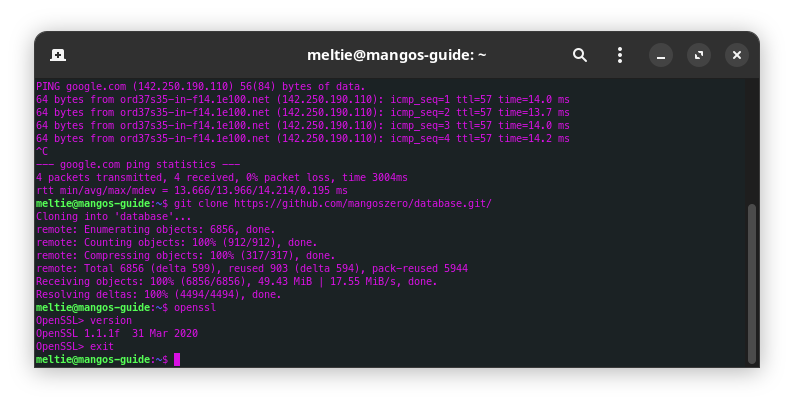
-
Issue with database mismatch structure
Meltie replied to KillRIde's topic in Peer to Peer Technical Support
You'll need to recompile your source, then you should be ready to go. -
Issue with database mismatch structure
Meltie replied to KillRIde's topic in Peer to Peer Technical Support
@KillRIde First off you'll have to remove the initial install of OpenSSL by using this command. sudo apt remove openssl libssl-dev Then download these packages from Ubuntu repository archive and install the packages. # Download OpenSSL 1.1.1f packages wget http://archive.ubuntu.com/ubuntu/pool/main/o/openssl/openssl_1.1.1f-1ubuntu2.19_amd64.deb wget http://archive.ubuntu.com/ubuntu/pool/main/o/openssl/libssl-dev_1.1.1f-1ubuntu2.19_amd64.deb wget http://archive.ubuntu.com/ubuntu/pool/main/o/openssl/libssl1.1_1.1.1f-1ubuntu2.19_amd64.deb # Install required packages sudo dpkg -i libssl1.1_1.1.1f-1ubuntu2.19_amd64.deb sudo dpkg -i openssl_1.1.1f-1ubuntu2.19_amd64.deb sudo dpkg -i libssl-dev_1.1.1f-1ubuntu2.19_amd64.deb To ensure when updates are available for install, to hold back the new version of OpenSSL 3.x libraries with these commands. sudo apt-mark hold openssl sudo apt-mark hold libssl-dev -
Issue with database mismatch structure
Meltie replied to KillRIde's topic in Peer to Peer Technical Support
Which version of OpenSSL are you using currently on your machine? OpenSSL 3.x will cause login issues do to it not being supported yet. -
Awesome, good to hear!
-
Looks like you're getting an internal compiler error by the looks of it. Try deleting your build folder and attempt to set it up again. I am testing the source with ARM on my workstation virtually and see if I get the same results. Far as I know, the sources should build without an issue to my knowledge.
-
@Meepgos I ran a small test on one of my Ubuntu 23.04 containers and it works as intended. That post was a bit out-dated but here's the method you should follow. Remove OpenSSL 3.x sudo apt remove openssl libssl-dev Install OpenSSL 1.1.x # download binary openssl packages wget http://archive.ubuntu.com/ubuntu/pool/main/o/openssl/openssl_1.1.1f-1ubuntu2.19_amd64.deb wget http://archive.ubuntu.com/ubuntu/pool/main/o/openssl/libssl-dev_1.1.1f-1ubuntu2.19_amd64.deb wget http://archive.ubuntu.com/ubuntu/pool/main/o/openssl/libssl1.1_1.1.1f-1ubuntu2.19_amd64.deb # install downloaded binary packages sudo dpkg -i libssl1.1_1.1.1f-1ubuntu2.19_amd64.deb sudo dpkg -i openssl_1.1.1f-1ubuntu2.19_amd64.deb sudo dpkg -i libssl-dev_1.1.1f-1ubuntu2.19_amd64.deb Run openssl command, then version to display the version installed. If you need any other help, feel free to reach out to me on Discord or here.
-
Follow this post here and install OpenSSL 1.1.x, since Mangos doesn't support OpenSSL 3.x yet. We are working it but not 100% ready yet. The packages listed should work on Ubuntu 23.04, even though it's mentioning Ubuntu 22.04. If you are able, backup your system before attempting this.
-
Which version is your OpenSSL since you are running Ubuntu 23.04?
-
Upgrade from MangosZero to MangosOne
Meltie replied to Перминов Алексей's topic in Peer to Peer Technical Support
@Перминов Алексей Doing the initial migration from one database to another can be a challenge for some not use to database structuring etc. I have done data migration from vMangos over to Mangos a few times a few months ago when playing with possible migration/transfer methods via SQL scripts.The best advise I can give you is to research the table structures within the character database itself, since account data is the most easiest to migrate. These will be the main tables to focus on below. Remember to study each table respectively per project. These tables below should remain the same across all projects with some naming differences. Achievements you wont have to worry about since original Classic (Vanilla) didn't have them yet. 1. Characters 2. Character Account Data 3. Character Achievements 4. Character Achievement Progression 5. Character Actions 6. Character Glyphs 7. Character Homebinds 8. Character Inventory: Includes item_instance table 9. Character Pets 10. Character Quest Status: Includes Daily, Weekly, Monthly, Rewarded and Seasonal 11. Character Reputation 12. Character Skills 13. Character Spells 14. Character Talent I may be able to help with the migration process as long as it's not related to public servers. I am planning to release these scripts publicly per project once I have all the methods ironed out 100% without issues. Best of luck! -
Database compatibility with different cores
Meltie replied to Magissia's topic in Peer to Peer Technical Support
Hello @Magissia! Compatibility of using different databases are very low as each project has their own structure builds for the databases. Migration from one project to another is possible but with a list of caveats. As for migrating account data, those structures haven't changed much since Mangos prime days. But here are a list of caveats you need to be aware of below. - Migrating character data with no data loss is vary slim and will require resetting most progression such as Skills, Skill Bars etc. - Character mail, auctions and some achievements as they are realm specific - such as Realm First Achievements. This does include some gifts as well. - Inventories of players can be the most pain in the butt when it comes to migration into existing database of players. New entries will need to be generated to fit the data without overwriting existing character data. If the destination database is empty, it's straight forward then. I've done a few migrations for some people that have requested it, but only have had 89% success rate with Mangos related projects. E.g. Mangos -> Trinity for example. When migrations are within the same project like Mangos Zero -> Mangos One, the success rate is much higher. If you want to chat about this on a deeper level, message me here or find me on Mangos Public Discord. -
mangos>Segmentation fault (core dumped)
Meltie replied to Yogsoggoth's topic in Peer to Peer Technical Support
@Yogsoggoth You'll need to install OpenSSL 1.1.x, not OpenSSL 3.x. Ubuntu 22.04 ships with OpenSSL 3.x by default. Follow this below and you'll be up and running in no time. To remove OpenSSL 3.x sudo apt remove openssl libssl-dev Install OpenSSL 1.1.x # download binary openssl packages from Impish builds wget http://archive.ubuntu.com/ubuntu/pool/main/o/openssl/openssl_1.1.1f-1ubuntu2.19_amd64.deb wget http://archive.ubuntu.com/ubuntu/pool/main/o/openssl/libssl-dev_1.1.1f-1ubuntu2.19_amd64.deb wget http://archive.ubuntu.com/ubuntu/pool/main/o/openssl/libssl1.1_1.1.1f-1ubuntu2.19_amd64.deb # install downloaded binary packages sudo dpkg -i libssl1.1_1.1.1f-1ubuntu2.19_amd64.deb sudo dpkg -i openssl_1.1.1f-1ubuntu2.19_amd64.deb sudo dpkg -i libssl-dev_1.1.1f-1ubuntu2.19_amd64.deb -
Problems with MangosZero on Linux
Meltie replied to AriathTheSage's topic in Peer to Peer Technical Support
Glad it's now working for you. -
Problems with MangosZero on Linux
Meltie replied to AriathTheSage's topic in Peer to Peer Technical Support
Those packages should be alright to remove, the system itself won't uninstall anything that it needs. If you are unsure, I would backup and/or snapshot the virtual machine before continuing. I've had that list pop up when I did the downgrade on OpenSSL and the system is working just fine. From my Ubuntu 22.04 machine. So I believe you'll be fine. If you need anymore help, feel free to message me.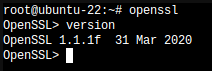
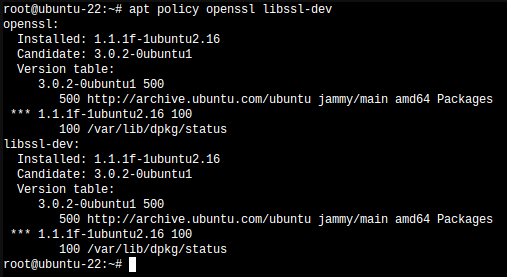
-
Problems with MangosZero on Linux
Meltie replied to AriathTheSage's topic in Peer to Peer Technical Support
First off you are only removing the libssl-dev and not openssl together. Remove related OpenSSL packages. sudo apt remove openssl libssl-dev Install OpenSSL 1.1.x # download binary openssl packages from Impish builds wget http://archive.ubuntu.com/ubuntu/pool/main/o/openssl/openssl_1.1.1f-1ubuntu2.19_amd64.deb wget http://archive.ubuntu.com/ubuntu/pool/main/o/openssl/libssl-dev_1.1.1f-1ubuntu2.19_amd64.deb wget http://archive.ubuntu.com/ubuntu/pool/main/o/openssl/libssl1.1_1.1.1f-1ubuntu2.19_amd64.deb # install downloaded binary packages sudo dpkg -i libssl1.1_1.1.1f-1ubuntu2.19_amd64.deb sudo dpkg -i libssl-dev_1.1.1f-1ubuntu2.19_amd64.deb sudo dpkg -i openssl_1.1.1f-1ubuntu2.19_amd64.deb This is how I got around it on Ubuntu 22.04 for the time being. -
Problems with MangosZero on Linux
Meltie replied to AriathTheSage's topic in Peer to Peer Technical Support
You need to uninstall OpenSSL 3.x before attempting to use OpenSSL 1.1.x. Once OpenSSL 3.x is uninstalled, you'll have to install OpenSSL 1.1.x manually on the command line. I was doing some testing the past few days and how I got it to use the correct version. Note: OpenSSL 3.x support is on the way, but will take some time to make sure everything is working right. -
Welcome to the community!
-
Getting "You don't know that language" when turning on or off AFK mode
Meltie commented on NiteKat's bug in Mangos Zero
This bug does not exist in M3 (Cataclysm). Appears to exist only in M0 (Vanilla). -
Problems with MangosZero on Linux
Meltie replied to AriathTheSage's topic in Peer to Peer Technical Support
Segmentation fault is more then likely coming from the OpenSSL library, cause I've seen this happen on my local machines with version 3.x. Ubuntu 22.04 ships with OpenSSL 3.x by default. More then likely have to reinstall OpenSSL library with version 1.1.x instead of 3.x. Still need to implement proper messages within CMake itself to warn users using OpenSSL 3.x. I would try Ubuntu 21.10 or 20.04 and see if this happens again. -
Getting "You don't know that language" when turning on or off AFK mode
Meltie commented on NiteKat's bug in Mangos Zero
Changed Status to Confirmed Changed Implemented Version to Unset Changed Milestone to Unset Changed Priority to Normal Changed Sub-Category to Minor -
I don't think the owner has had much time to work on this project lately. Might have to wait and see when they have the time to make some more progress on it. The user has been active recently. Just have to see what happens.
-
Changed Status to Completed Changed Implemented Version to 22.xx (Current Master Branch) Changed Milestone to Unset Changed Priority to New