


madmax
-
Posts
2064 -
Joined
-
Last visited
-
Days Won
75 -
Donations
0.00 GBP
Content Type
Bug Tracker
Wiki
Release Notes
Forums
Downloads
Blogs
Events
Everything posted by madmax
-
Our monthly donation goal is open! If you can spare even just £5 that does help us. The server costing us around £90/month to have co-located to a rack. Link for sending donation as always is https://www.getmangos.eu/donate/goal-2-getmangos-community-donations/ Click the yellow text on that page to set up a recurring (monthly) donation. Thanks again to those of you that do help with the financial cost of the server upkeep, it is very much appreciated
-
Our monthly donation goal is open! If you can spare even just £5 that does help us. The server costing us around £90/month to have co-located to a rack. Link for sending donation as always is https://www.getmangos.eu/donate/goal-2-getmangos-community-donations/ Click the yellow text on that page to set up a recurring (monthly) donation. Thanks again to those of you that do help with the financial cost of the server upkeep, it is very much appreciated
-
Our monthly donation goal is open! If you can spare even just £5 that does help us. The server costing us around £90/month to have co-located to a rack. Link for sending donation as always is https://www.getmangos.eu/donate/goal-2-getmangos-community-donations/ Click the yellow text on that page to set up a recurring (monthly) donation. Thanks again to those of you that do help with the financial cost of the server upkeep, it is very much appreciated
-
We are now past half way into the month and so far have only have £25 donated, so if you can spare a few £ or $ please do head over to the link below If you can spare even just £5 that does help us. The server costing us around £90/month to have hosted. Link for sending donation as always is https://www.getmangos.eu/donate/goal-2-getmangos-community-donations/ Click the yellow text on that page to set up a recurring (monthly) donation. Thanks again to those of you that do help with the financial cost of the server upkeep, it is very much appreciated.
-
Our monthly donation goal is open! If you can spare even just £5 that does help us. The server costing us around £90/month to have co-located to a rack. Link for sending donation as always is https://www.getmangos.eu/donate/goal-2-getmangos-community-donations/ Click the yellow text on that page to set up a recurring (monthly) donation. Thanks again to those of you that do help with the financial cost of the server upkeep, it is very much appreciated
-
Bumped into Rexxar today and he was not pathing! Will have to speak to chuck and follow up on this at a later time.
-
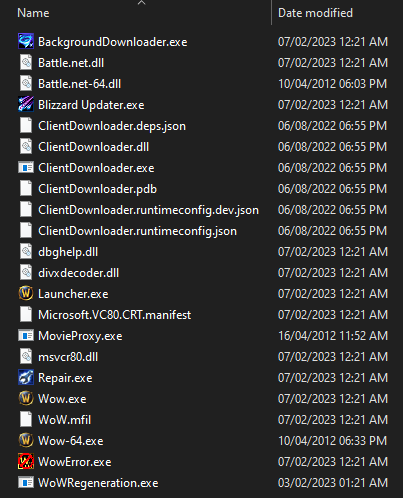
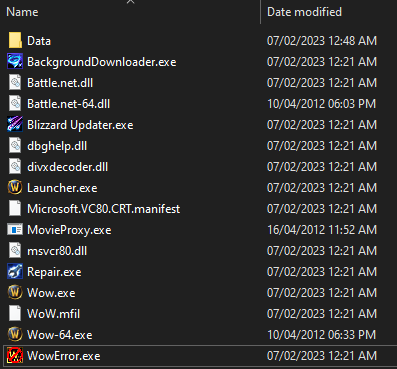
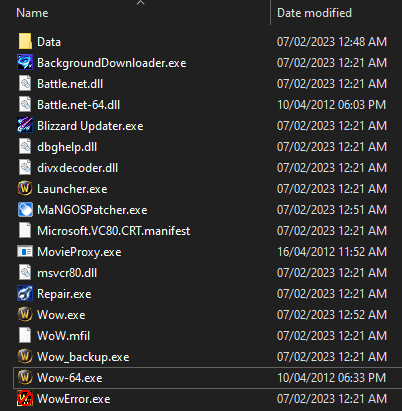
Downloading World of Warcraft: Cataclysm 4.3.4 Client This is a temp guide until @antz finalizes where we are keeping our forks and such. Thanks to the Cataclysm Preservation Project for the tools used. For the client base files you can use https://github.com/The-Cataclysm-Preservation-Project/ClientDownloader/releases/tag/1.2 Once you have extracted to a folder and ran you should have something like this... You can now delete the ClientDownloader files Now download WoWRegen tool https://github.com/The-Cataclysm-Preservation-Project/wowregeneration/blob/master/Binary/WoWRegeneration.exe?raw=true Run WoWRegeneration.exe from within the folder where you have the client files, you should see a folder appear while it downloads called WoW-15595 - inside you will find a Data folder Once the download has completed move the Data folder so it is with WoW.exe It should look like this now... Now we have an "untouched" 4.3.4 install! but wait we need to make this work with MaNGOS! Head over to here and grab the official MaNGOS patcher - https://github.com/mangosthree/tools/blob/master/MaNGOSPatcher/_extras/MaNGOSPatcher.exe?raw=true Once we have that you can run it in the folder with Wow,exe and you should end up with it looking like this... That's it, you're done! Do not use the Wow-64.exe until the MaNGOS patcher can be updated to take care of that file too, for now stick to the regular Wow.exe. Never run launcher! (you need to rename that to be safe and prevent updating). Follow the MaNGOS guides in the wiki for setting up the server and client etc (this post is to cover just getting the files)
-

Sync account set addon command
madmax commented on madmax's bug in Archived Tasks (Zero)(Resolved issues)
Changed Status to Completed Changed Implemented Version to 22.xx (Current Master Branch) Changed Milestone to 22 (Current) -
Sync account set addon command
madmax commented on madmax's bug in Archived Tasks (Zero)(Resolved issues)
The messages all look identical now. Closing this. -
On the mangosd console you can type: help account set addon That should give you enough info to figure this out. example: account set addon madmax 2 You can also use a database editor to open the database "realmd" and then under "account" you can open that and should have the accounts listed and set the level of expansion in there.
-
First screenshot shows you missing a double -- in front of depth?
-
Just wrap the .exe is a bat file. You can use most bat files that restart game servers and just adapt the code to what you need. In our case we are using this. Keep in mind what we use runs on the desktop though so not as a service, if that's what you want I'm not sure as I dont usually use services for this as i like to see the console. ::=======================:: :: Server Guardian :: ::=======================:: ::=======================:: :: SET YOUR VARIABLES! :: ::=======================:: ::=======================:: :: Window and Log name :: :: Replace "My Server" :: ::=======================:: set servername=M0 COSMIC RAY ::=======================:: :: Your start command :: :: Replace after = :: ::=======================:: set runcmd=mangosd.exe -c mangosd.conf -a ahbot.conf ::=======================:: :: End of variables :: ::=======================:: :: This will keep the window clean and easy to read @ECHO off :: Sets the title of the window title Guardian Script %servername% :: Clears the window incase there is anything there CLS :: Prints to the window what we are doing ECHO Server Guardian has been started! ECHO. ECHO ************************************************************************* ECHO To close the server, close this window and type exit in the server window ECHO ************************************************************************* ECHO. ECHO. ECHO %servername% is now starting... >> "logs\restart\%servername%.log" ECHO. >> "logs\restart\%servername%.log" ECHO. >> "logs\restart\%servername%.log" ECHO (%date%)(%time%) Server Guardian has been started! >> "logs\restart\%servername%.log" ECHO (%date%)(%time%) %servername% is now starting... :: This is a return point in case the server crashes or is closed :restart ECHO. ECHO (%date%)(%time%) %servername% is now ONLINE ECHO Watching %servername% for crashes... >> "logs\restart\%servername%.log" ECHO. >> "logs\restart\%servername%.log" ECHO (%date%)(%time%) %servername% is now ONLINE >> "logs\restart\%servername%.log" ECHO (%date%)(%time%) Watching %servername% for crashes... ::Start the actual server %runcmd% ECHO. ECHO (%date%)(%time%) Crash or Close detected! ECHO %servername% is now restarting... >> "logs\restart\%servername%.log" ECHO. >> "logs\restart\%servername%.log" ECHO (%date%)(%time%) Crash or Close detected! >> "logs\restart\%servername%.log" ECHO (%date%)(%time%) %servername% is now restarting... ::Server crashed or closed, so we point it to the return point to start the server again goto restart
-
Added this to the tracker so its logged. Add a GUI to the tracker that can do the following: Show the live output from the console (as currently shown now) Start and stop buttons - the server would not automatically start without a setting being set on first run of the GUI Title bar to show "Players: xx | Connections: xxx" (connections being open tcp connections to the process). Additional further things could be to parse the config file to check database connections are correct prior to the core actually loading. And update checking via a call to a simple version file stored on the assets.getmangos.eu domain.
-
Changed Status to Awaiting Feedback Changed Implemented Version to Unset Changed Milestone to Unset Changed Priority to New
-
@Aaron Briggs Can you give us something like an example to reproduce this? Or a video or something?
-
Changed Status to Confirmed Changed Assigned to madmax Changed Implemented Version to Unset Changed Milestone to Unset Changed Priority to Low
-
Will look into this when I have time.
-
critical Command ".ticket surveyclose" stops the server from responding
madmax commented on Cyber Mist's bug in Bugs
Changed Assigned to Elmsroth -
critical Command ".ticket surveyclose" stops the server from responding
madmax commented on Cyber Mist's bug in Bugs
Fixed in commit https://github.com/mangoszero/server/commit/d5a77b0965 and https://github.com/mangosone/server/commit/855de61c519d4bdf9aba842d32827d51e96b8bb5 -
critical Command ".ticket surveyclose" stops the server from responding
madmax commented on Cyber Mist's bug in Bugs
Changed Status to Completed Changed Implemented Version to 21.14 (Master Branch) Changed Milestone to 22 (Next) Changed Priority to Normal -
Installation mit EasyBuild und offene fragen
madmax replied to Tobi Rodriguez's topic in German / Deutsch
Is mangosd being hosted on the same computer as the wow client you are playing from? Or is the game on another computer? -
@onixiya received this from @Kungen Donald
-
@onixiya I have created a dedicated topic for this guide so it does not get to cluttered with lots of replies.
-
This is a support topic for the install guide "Installing Mangos on Debian 9 or a Debian based Distribtion"
-
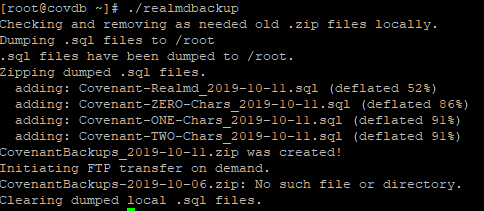 Original credit @H0zen rewritten in part by myself. Our covenant servers hold lots of user and character data, we need to make sure that is safe and one of the tasks we do is multiple daily backups to an offsite FTP server. This script is ran via cronjob and can be ran as many times a day as you like. You will need to run things like "yum install ftp" for the ftp part and have zip installed. Make sure you change the parts suck as yourbackupfilename, servername, MySQL/FTP details, the password on the zip file and the folder path "remotefolder" in the FTP transfer section. #!/bin/sh # Archive & file variables ARCHIVE=yourbackupfilename`date +"%F"` OLDARCHIVE=yourbackupfilename-`date --date '-5 days' +"%F"` FILE=servername-Realmd_`date +"%F"` FILE0=servername-ZERO-Chars_`date +"%F"` FILE1=servername-ONE-Chars_`date +"%F"` FILE2=servername-TWO-Chars_`date +"%F"` # MySQL variables DBSERVER=127.0.0.1 REALMD_DATABASE=realmd CHARACTERSS_ZERO_DATABASE=characters-classic_servername CHARACTERSS_ONE_DATABASE=characters-tbc_servername CHARACTERSS_TWO_DATABASE=characters-wotlk_servername USER=rootuser PASS=rootpassword # FTP transfer on demand connection & login details FTP_USER=ftpuser FTP_PASS=ftppass FTP_HOST=ftphostname # Remove previous .zip files if multiple daily backups are being ran echo "Checking and removing as needed old .zip files locally." rm -f $ARCHIVE.zip rm -f $OLDARCHIVE.zip # Dump MySQL database in .sql files into /root echo "Dumping .sql files to /root" mysqldump --opt --user=${USER} --password=${PASS} ${REALMD_DATABASE} > ${FILE}.sql mysqldump --opt --user=${USER} --password=${PASS} ${CHARACTERSS_ZERO_DATABASE} > ${FILE0}.sql mysqldump --opt --user=${USER} --password=${PASS} ${CHARACTERSS_ONE_DATABASE} > ${FILE1}.sql mysqldump --opt --user=${USER} --password=${PASS} ${CHARACTERSS_TWO_DATABASE} > ${FILE2}.sql echo ".sql files have been dumped to /root." # Zip dumped MySQL .sql files and password the zip file echo "Zipping dumped .sql files." zip -e -P backupfilepassword $ARCHIVE.zip $FILE.sql $FILE0.sql ${FILE1}.sql ${FILE2}.sql # Show the user the result echo "${ARCHIVE}.zip was created!" # Move the file via ftp to remote NAS echo "Initiating FTP transfer on demand." ftp -n $FTP_HOST <<END_SCRIPT quote USER $FTP_USER quote PASS $FTP_PASS cd remotefolder/remotefolder binary delete $OLDARCHIVE.zip put $ARCHIVE.zip quit END_SCRIPT # FTP transfer on demand ends # Tidy up files in the /root folder rm -f /root/*.sql echo "Clearing dumped local .sql files." Mangos Backup Cron Script.txt